Tree inspection software for UK arborists
Tree inspections, from field to finished report.
Capture tree data on site, even without signal. Review your findings, then issue a professional arboricultural report without rebuilding your notes at the end of the day.
- Survey on site without signal
- Nothing is issued until you approve it
- BS 3998-oriented workflow
- 1
Field
Trees, photos, GPS and voice notes, captured on site with or without signal.
- 2
Structure
Findings held as structured survey data, with rule-based candidate actions.
- 3
Review
You check every value, edit the draft wording and approve it.
- 4
Report
A numbered, professional PDF, ready to issue.
The problem
Less time turning field notes into paperwork.
Inspecting the tree is rarely the hard part. The hard part is everything around the inspection: keeping notes, photographs, locations and recordings with the right tree, then writing it all up.
Field notes
Scattered notes, measurements and observations.
Photos
Hundreds of images that need to stay with the correct tree.
GPS
Locations that need to stay attached to the survey record.
Voice notes
Useful observations captured on site, but hard to turn into structured report language.
Admin
Hours spent converting field information into a professional report.
Back at the desk
- IMG_4021.jpg
- Voice 031.m4a
- site visit notes
- IMG_4022.jpg
- map screenshot.png
- T4 ??
- IMG_4025.jpg
- Report_v3_FINAL.docx
T4
Fagus sylvatica (beech)
- Dimensions
- 1050 mm24 m20 m
- Location
- 52.204905, 0.121730±7 m
How it works
From first tree to issued report, in one app.
Follow one survey through the five steps the inspector takes: three on site, two back in signal. The screens are recreated from the ARB-FLO app, using the fictional project behind the sample report.
Step 1 of 5
Create your project
Set the site up once: name, client, location, date, weather and the inspecting arborist. These details head every page of the report, so they are captured before the first tree.
- Client, site, date and weather recorded once for the whole survey
- Inspector name and qualifications carried into the report
- Saved on the device if you are offline, then synced
Works without signal; syncs when you are back online
Voice-first field capture
Keep your eyes on the tree.
Typing into a phone while you stand under a canopy is slow and awkward. Say what you see instead. ARB-FLO proposes the structured values, each one quoted from your words, and you decide which stand.
- Voice
- Transcript
- Extraction
- You confirm
- Tree record
What was said
T4, over-mature beech, approximately 1050 millimetres DBH, about 24 metres tall, crown spread around 20 metres. Moderate cavity on the south side of the stem at about one and a half metres, and minor deadwood scattered through the crown. There might be some decay at the base. No obvious fungal brackets. I’d recommend a crown clean.
- Becomes a value
- Needs confirmation
- Stated as not observed
- Works mentioned
What ARB-FLO proposes
- From speech
Tree ID
T4
- From speech
Species
Beech
- From speech
Age class
Over-mature
- ≈ Approximate
DBH
1050 mm
- ≈ Approximate
Height
24 m
- ≈ Approximate
Crown spread
20 m
- From speech
Cavities
Moderate
- From speech
Deadwood
Minor
- Needs confirmation
Basal decay
Not graded
“There might be some decay at the base” Waits for your decision.
Stated as not observed
“No obvious fungal brackets”. Not recorded as a finding.
Works you mentioned
“I’d recommend a crown clean”. Not added to the survey.
Quoted, not invented
Every value has to be supported by words in the transcript. Anything the transcript does not support is discarded.
Hedges are flagged
“Might be” and “maybe” become Needs confirmation, not a recorded finding, until you decide.
Speech never becomes advice
Works you mention are kept for reference. Recommended works come from knowledge-base rules and your own choices.
Live transcription uses your browser’s speech service where it is available and is switched on per device; otherwise you type what you said. Extraction understands English and common UK species names, and anything it cannot place stays in your notes for you to review. The capture screen states where audio and text are processed.
Offline-first
Built for the field. Even without signal.
ARB-FLO is a progressive web app designed around unreliable field connectivity. Survey data is saved on the device first and synchronised when connectivity returns.
Online01
Survey as normal
Trees are saved straight away and appear in the inventory.
Offline02
Keep working
No signal in the woodland? Keep surveying. Work is saved on the device and queued.
Online03
Sync
Back in signal, the queue is sent in order and the inventory catches up.
Works with no signal
- Create and edit projects and trees
- Record GPS position, dimensions and defects
- Add photographs
- Record voice notes
- Open projects and trees already loaded on the device
Needs a connection
- Turning a recording into tree data
- Drafting the report wording
- Approving a tree
- Generating a report
- Reopening a tree created offline, until it has synced
Each change is queued with its own identifier and replayed in order, so a retry never creates a duplicate tree. A sync screen lists what is waiting and lets you retry or discard a change the server rejected.
Professional reports
From field data to a report you can actually issue.
The report is generated from the approved survey record, not retyped. Browse the pages of a sample report below, or download the whole PDF.

Page 1 of 13. Client, site, inspector and a numbered issue on the cover. Select the page to open it full size.
What goes into a report
Project information. Client, site, date, weather and inspector, captured once and carried through.
Tree schedule. Every tree in one table, with its defects, recommended works and timescale.
Findings. Recorded defects with their severity, tree by tree.
Recommendations. Approved works, each with its basis: a knowledge-base rule or the inspector.
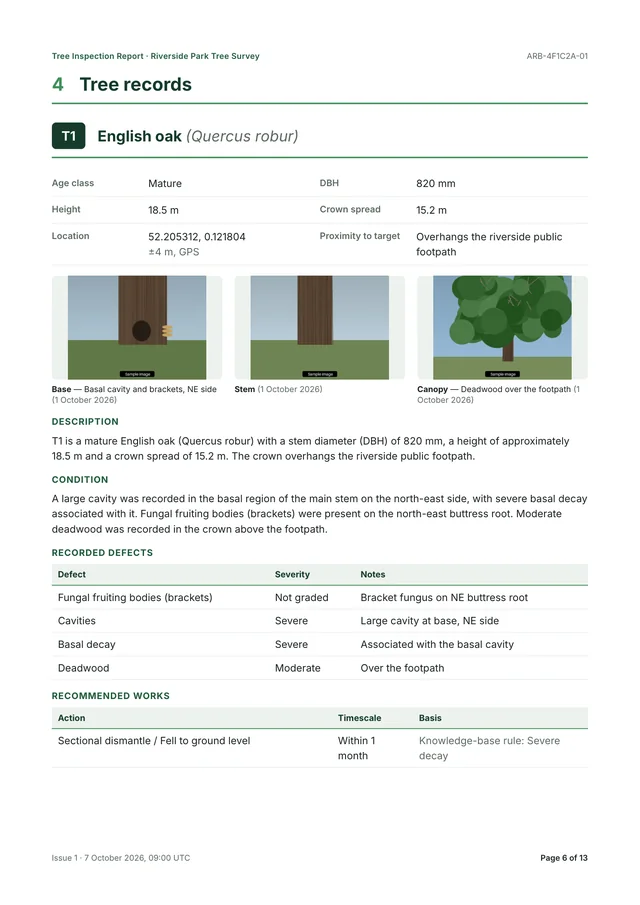
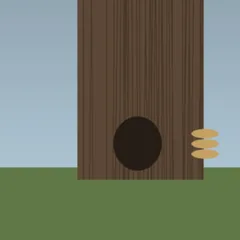
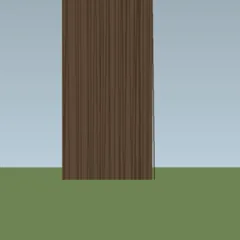
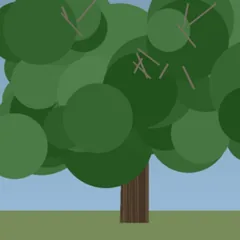
Photographs. Base, stem and canopy photographs alongside each tree record.
Location. A site plan drawn from the recorded GPS positions, with each tree’s accuracy stated.
Numbered issues. Each issue is numbered and stored with a snapshot of the data behind it.
Professional formatting. A consistent cover, contents, headers, footers and page numbers, as a PDF.
- Issue 1
- Numbered issue
- 13 pages
- Cover to declaration
- 6 trees
- Each with a record
A real report generated by ARB-FLO from the fictional survey shown on this page: the client, site and inspector are invented, and the photographs are sample images. The inspector remains responsible for the content of every report they issue.
Want to see one built? A demo runs a survey from the first tree to the issued PDF.
Request a demoStructured and deterministic
Facts, rules and wording, kept apart.
ARB-FLO holds three things separately: what you recorded, what the knowledge base says follows from it, and how it is written up. Rules decide the second. AI, where it is used, only drafts the third.
1 · yours
Facts
T4 · Beech (Fagus sylvatica)
- Age class
- Over-mature
- DBH
- 1050 mm
- Height
- 24 m
- Crown spread
- 20 m
Structured fields from the knowledge-base defect library. Only you change them.
2 · knowledge base
Rules
Why: Deadwood recorded
Crown clean / removal of deadwood
Cavities
The knowledge base defines no action for this. ARB-FLO says so and leaves the action to you, if you want one.
Fixed rules, so the same facts give the same suggestions. They are candidates: you include, edit or drop each one.
3 · AI-assisted, optional
Wording
AI draft
Unreviewed. Written only from the recorded facts.
T4 is an over-mature beech (Fagus sylvatica) with a DBH of 1050 mm, a height of 24 m and a crown spread of 20 m.
A moderate cavity was recorded on the south side of the stem at approximately 1.5 m. Minor deadwood was scattered through the crown.
Wording only. It never adds findings and never proposes actions, and you approve every word.
Mapped today
Restraint over invention
The rules use the knowledge base’s own wording, and ARB-FLO does not present anything as derived from BS 3998 unless the knowledge base says so. A recorded defect with no rule is never given an invented action: it is flagged, and the decision stays with the inspector.
- DeadwoodCrown clean / removal of deadwood
- Proximity to targetCrown reduction or lateral pruning
- Severe decaySectional dismantle / Fell to ground level
Human-in-the-loop AI
AI assists. The arborist decides.
ARB-FLO does not give a language model control of the inspection. It keeps facts, recommendations and prose separate, and puts your approval between the draft and the report.
AI draft
Unreviewed. Written only from the recorded facts. Nothing here reaches a report until you approve it.
Condition
A moderate cavity was recorded on the south side of the stem at approximately 1.5 m. Minor deadwood was scattered through the crown.
Labelled as a draft, kept separately, and never copied into a report on its own.
Approved content
Inspector-approved final contentApproved by Alex Morgan on 3 October 2026, 14:20 UTC · drafted with AI assistance and reviewed by the inspector.
Recommended works
- Crown clean / removal of deadwood · Within 3 months
- Assess the extent of decay at the stem cavity · Within 3 months
Only content in this state is issued in a final report.
The model only sees the facts
It is given the tree’s recorded facts and field notes, and nothing else. Client name, site address and coordinates are never shared with the AI provider.
Output is checked, not trusted
An incomplete survey cannot be drafted or approved. Drafts must pass a strict schema, and checks flag figures, defects, decay, hazard or stability wording and recommendations the record does not support.
It never proposes actions
Recommended works come from knowledge-base rules and your own choices. The model does not add findings, grade severity or assess risk.
The report says so
Where AI-assisted wording is used, the report’s limitations state it, and that the inspector reviewed and approved it.
AI drafting is optional. With no AI provider configured, ARB-FLO assembles the draft from your notes with a template and labels it as a template, never as AI-assisted.
Reduce admin. Don’t replace professional judgement.
Features
Built around field arboriculture, not a generic workflow.
Fifteen capabilities, each one something the app does today.
01
Capture in the field
Everything you gather on site, kept with the right tree.
Offline-first surveys
Create projects and trees, add photographs and record voice notes with no signal. Changes queue on the device and sync when you are back online.
GPS location capture
Take a GPS fix with its accuracy shown, or type coordinates in. The position stays with the tree.
Tree inventory
Every tree in the project in one list, with species, stem diameter, height and status at a glance.
Voice notes
Record a note against each tree, play it back, replace it or delete it. Recordings never appear in the report.
Photo capture
Base, stem and canopy photographs for each tree, orientation-corrected and prepared for the report.
02
Structure and decide
Facts, rules and wording kept apart, with you in charge.
Structured tree data
Species, age class, dimensions, defects, target and notes held as fields, so every survey has the same shape.
Knowledge-base-driven findings
Defects come from the knowledge-base library rather than free text, so a finding is recorded the same way every time.
Deterministic recommendations
Candidate actions follow fixed knowledge-base rules and show their reasoning. Where there is no rule, none is invented.
AI-assisted prose
Drafts report wording from the recorded facts only. Output is checked against the record and labelled as a draft. It never proposes actions.
Human review
Nothing reaches a final report until you have reviewed, edited and approved it.
03
Issue and integrate
A report you can stand behind, and data that is not locked in.
Professional PDF reports
Numbered reports with a cover, contents, site plan, tree schedule, tree records with photographs, limitations and declaration.
Audit trail
Issued reports are immutable and numbered, stored with a snapshot of their data and a SHA-256 checksum. Drafts are kept apart from approved text.
Data export
Reports download as PDF. The survey data behind them is structured and available through a documented REST API.
Progressive web app
Install from the browser to your home screen. No app-store account, download or review queue.
Integrations and webhooks
Signed events fire when a tree is approved and when a report is generated, so other systems can follow along. An example n8n workflow is included.
Who it’s for
For people who inspect trees and answer for the report.
From the sole practitioner to a practice with systems of its own. Designed around UK inspection practice: report wording uses the terminology of BS 3998:2010, in British English and metric units.
Independent arborist
Spend less time writing up surveys.
- Survey, review and report from one phone
- Your approval, your declaration, your numbered report
Arboricultural consultancy
Standardise field data and reporting, survey after survey.
- One defect vocabulary and one report structure
- Every issue numbered the same way
Tree surveyor
Capture structured information without slowing down in the field.
- Voice, photographs and GPS kept with the right tree
- Works on site with no signal
Larger practice
Build a consistent digital workflow around your existing systems.
- Signed events when trees are approved and reports generated
- A documented REST API for the survey data
ARB-FLO is built around a single inspector’s workflow today. Sign-in and shared team accounts are not part of the product yet, and we will say so plainly when we scope a pilot with you.
Demo and pilot programme
Spend less time writing up tree surveys.
See ARB-FLO run through a survey, from field capture to the issued report, or ask to join the pilot programme.
What happens next
- 1
You send the form. A name and an email address are all we need. No account, no payment details.
- 2
We reply by email. To arrange a time that suits you. We use your details only to reply.
- 3
We walk through a survey. From the first tree to the issued report, and talk honestly about whether ARB-FLO, or the pilot, fits how you work.
Request a demo
Or ask about the pilot, or send us a question.